10個簡單易行的宿舍萬聖節裝飾創意,不會損壞牆壁

打造充滿節日氣氛的宿舍房間,提供 10 個適合牆面裝飾的萬聖節裝飾創意、租房者友好的展示技巧、消防安全檢查和移除指南。
如何在 Windows 10 中更改用戶帳戶類型: 首次設置 Windows 時,您需要創建一個用戶帳戶,使用該帳戶登錄 Windows 並使用您的 PC。此帳戶默認為管理員帳戶,因為您需要安裝應用程序並將其他用戶添加到需要管理員權限的 PC。當您在 Windows 10 PC 上添加其他帳戶時,默認情況下這些帳戶將是標準用戶帳戶。
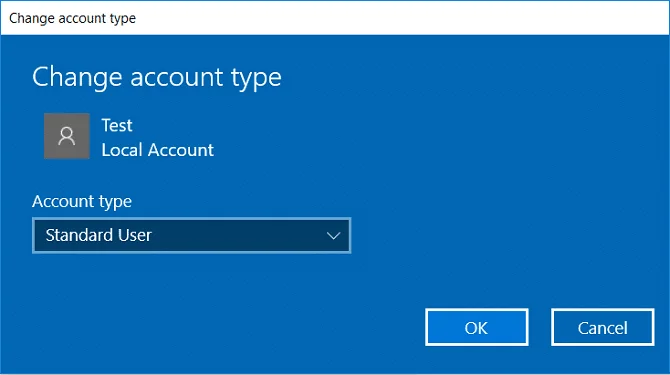
Administrator Account: This type of account have complete control over PC and can make any changes to PC Settings or make any type of customization or install any App. Both a Local or Microsoft account can be an administrator account. Because of virus & malware, Windows Administrator with full access to PC settings or any program becomes dangerous so the concept of UAC (User Account Control) was introduced. Now, whenever any action that requires elevated rights is performed Windows will display a UAC prompt for the administrator to confirm Yes or No.
標準帳戶:此類帳戶對 PC 的控制非常有限,適用於日常使用。與管理員帳戶類似,標準帳戶可以是本地帳戶或 Microsoft 帳戶。標準用戶可以運行應用程序,但不能安裝新應用程序和更改不影響其他用戶的系統設置。如果執行任何需要提升權限的任務,Windows 將顯示一個 UAC 提示,提示輸入管理員帳戶的用戶名和密碼,以便通過 UAC。
Now after installing Windows, you may want to add another user as the Standard account but in future, you may need to change that account type from standard to administrator. So without wasting any time let’s see How to Change User Account Type in Windows 10 from Standard Account to Administrator Account or vice-versa with the help of the below-listed tutorial.
Note: For this, you need to keep at least one administrator account enabled on the PC all the time to perform the below steps.
Contents
How to Change User Account Type in Windows 10
確保 創建一個還原點 ,以防萬一出現問題。
方法 1:使用設置更改用戶帳戶類型
1.按Windows鍵+ I打開設置,然後單擊帳戶。

2.從左側菜單中單擊家庭和其他人。
3.現在在“其他人”下單擊您要更改帳戶類型的帳戶。
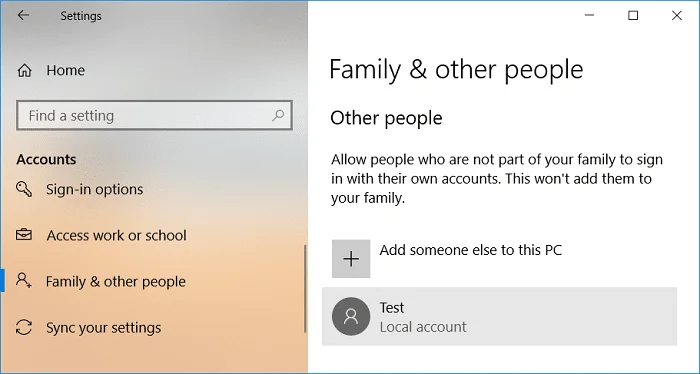
4.在您的帳戶用戶名下,單擊“更改帳戶類型”。
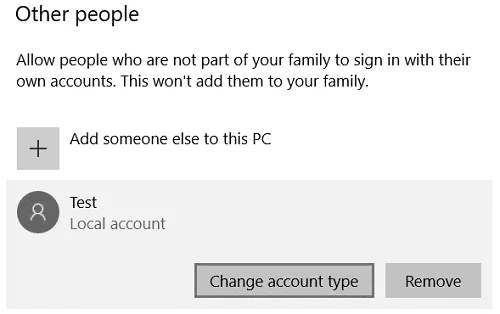
5.從帳戶類型下拉列表中,根據您的需要選擇標準用戶或管理員,然後單擊確定。
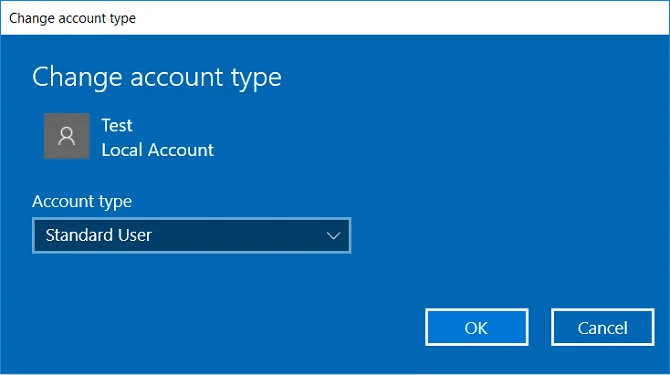
6.關閉設置,然後重新啟動您的 PC 以保存更改。
這是 如何在 Windows 10 中更改用戶帳戶類型,但如果您仍然無法更改,請按照下一個方法操作。
方法 2:使用控制面板更改用戶帳戶類型
1. 在 Windows 搜索中鍵入 control,然後從搜索結果中單擊控制面板。

2.接下來,單擊用戶帳戶,然後單擊“管理另一個帳戶”。

3.單擊要更改帳戶類型的帳戶。
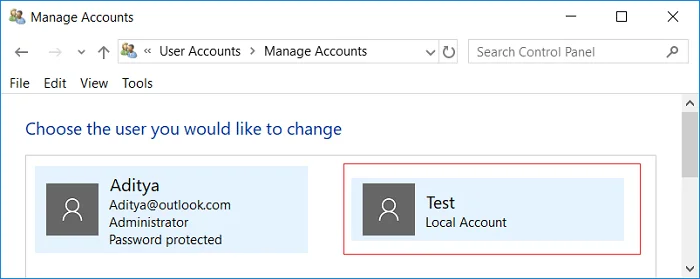
4.現在在您的帳戶下單擊“更改帳戶類型”。
5. 從帳戶類型中選擇標准或管理員,然後單擊更改帳戶類型。
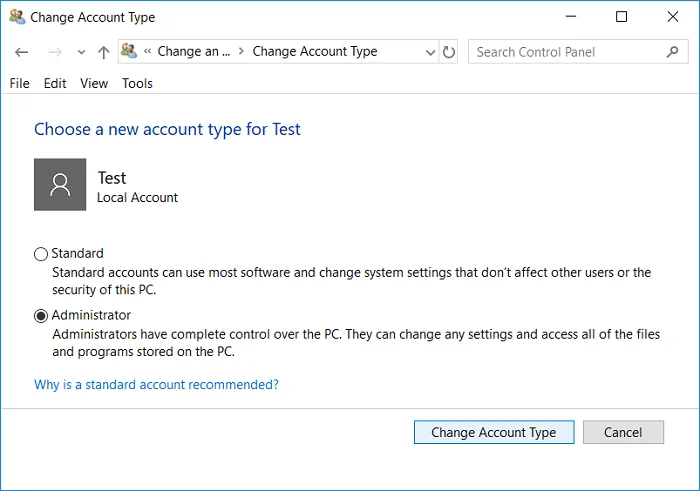
這是 如何使用控制面板在 Windows 10 中更改用戶帳戶類型。
方法 3:使用用戶帳戶更改用戶帳戶類型
1.按Windows鍵+ R然後鍵入netplwiz並按Enter鍵。

2.確保勾選“用戶必須輸入用戶名和密碼才能使用這台計算機”,然後選擇要更改帳戶類型的用戶帳戶,然後單擊“屬性”。

3.切換到組成員選項卡,然後根據您的喜好選擇標準用戶或管理員。
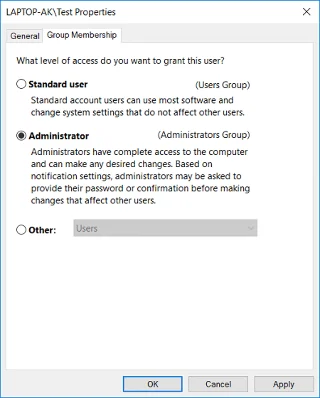
4. 單擊應用,然後單擊確定。
5.關閉所有內容,然後重新啟動您的電腦。
方法 4:使用命令提示符更改用戶帳戶類型
1.按Windows鍵+ X然後選擇命令提示符(管理員)。

2.Type the following command into cmd to change the account type from Standard User to Administrator and hit Enter:
net localgroup Administrators “Account_Username” /add
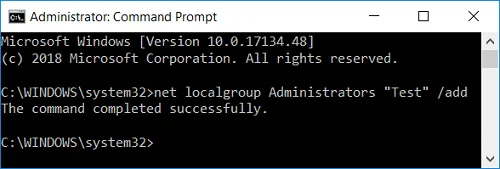
Note: Replace Account_Username with the actual userame of the account for which you want to change the type of. You could get the username of the standard accounts using the command: net localgroup users
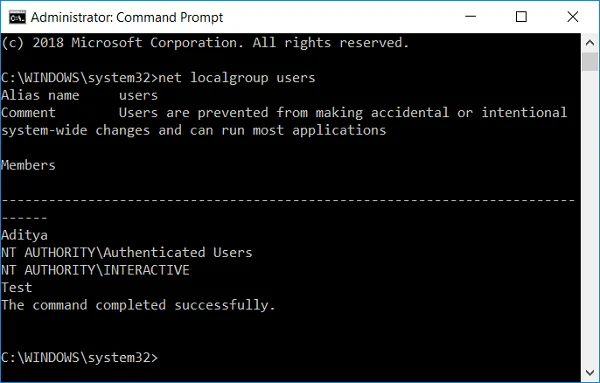
3.Similarly to change the account type from Administrator to Standard User use the following command:
net localgroup Administrators “Account_Username” /delete
net localgroup Users “Account_Username” /add

注意:將 Account_Username 替換為要更改其類型的帳戶的實際用戶名。您可以使用以下命令獲取管理員帳戶的用戶名:net localgroup administrators
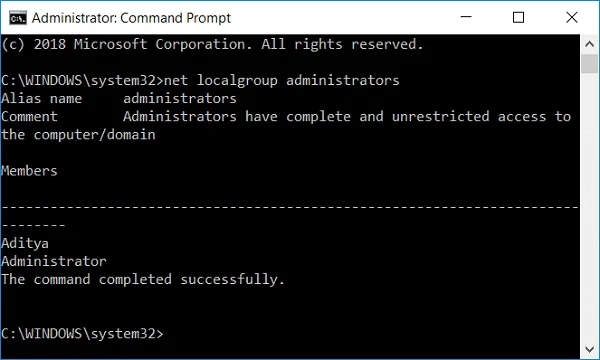
4.您可以使用以下命令檢查用戶帳戶的類型:
網絡本地組用戶
5.重新啟動您的PC以保存更改。
受到推崇的:
就是這樣,您已經成功學習瞭如何在 Windows 10 中更改用戶帳戶類型,但如果您對本教程仍有任何疑問,請隨時在評論部分詢問他們。
打造充滿節日氣氛的宿舍房間,提供 10 個適合牆面裝飾的萬聖節裝飾創意、租房者友好的展示技巧、消防安全檢查和移除指南。
策劃一場 80 年代恐怖片主題派對,設定恐怖等級,佈置復古裝飾,準備那個時代的服裝、簡單的零食和有趣的電影之夜遊戲。
打造2026年萬聖節的黑暗精緻造型,六個反派主題服裝創意、實用造型技巧、預算指導和安全檢查。
了解「青色南瓜計畫」在 2026 年的意義,主辦單位如何提供單獨的非食品類零食,以及家庭如何規劃路線並安全地查看糖果。
臺中市床墊屬大型應回收物,不能直接當一般垃圾丟。本文整理預約管道、清運資格、免費服務條件、搬到哪裡及等待清潔隊通知時的注意事項。
南投市卡式瓦斯罐用完後,應單獨包裝、標示並交給資源回收車,不能混入一般垃圾。本文整理南投縣「完、包、警、收」步驟、安全排空方式、收運查詢與家用瓦斯鋼瓶的不同處理管道。
宜蘭市舊筆電屬可回收的廢資訊物品,不應丟一般垃圾。整理 2026 年現行宜蘭縣與環境部規定,說明資源回收車、清潔隊、合格回收商、資料清除與鋰電池安全處理。
彰化市噴霧罐回收怎麼做?整理高壓容器「完、包、警、收」四步驟、垃圾車與定點收集差異、路線查詢方式及清潔隊聯絡資訊。
高雄市噴霧罐不可直接丟一般垃圾車。先確認用完;仍有內容物時在空曠通風處排空,勿戳洞,再單獨包裝、標示並交資源回收車,並查詢住家路線。
竹北市舊電視不能當一般垃圾丟。整理購買新機由業者免費回收、聯絡竹北市清潔隊預約、合法回收業者三種管道,並說明搬運前準備、成功判斷與何時該換方法。